
How to use this school SEO checklist
To run this school SEO checklist, open your website, your Google Business Profile and Google Search Console in three tabs. Mark each check Done, Fix or Not sure. Do the Foundations first. They decide whether Google can reach your site at all.
For a wider plan, read our guide to marketing for schools.
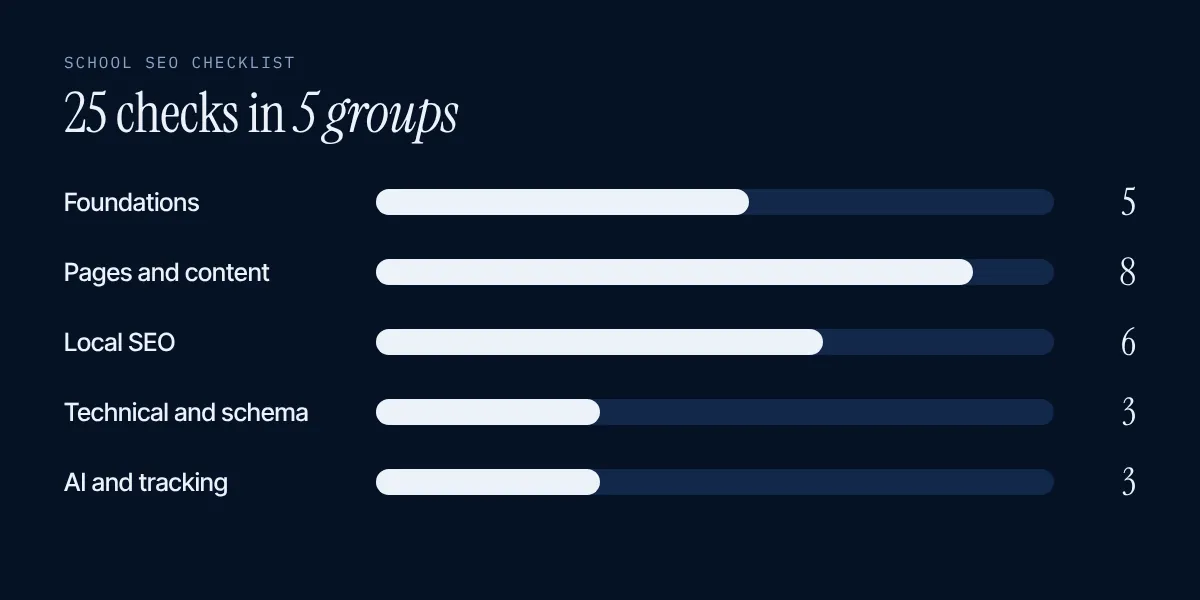
Foundations: can Google reach your site?
- Verify your site in Google Search Console. It is free. Use the URL Inspection tool to see how Google views a page and to ask for indexing in Search Console Help.
- Submit a sitemap. Google recommends a sitemap with last-modified dates when you add or change many pages. Do it after any redesign.
- Load every page over HTTPS. Visit the home page, admissions and contact pages and look for any warning.
- Check robots.txt. Open yourschool.org/robots.txt. A line that reads "Disallow: /" hides the whole site from search.
- Test speed on a phone. Good scores are LCP of 2.5 seconds or less, INP of 200 milliseconds or less and CLS of 0.1 or less at web.dev. Test with PageSpeed Insights.
Pages and content: can parents find answers?
- Give each key topic its own page: admissions, fees, open days, curriculum and contact. Do not hide them in a PDF.
- Write a unique title for every page. Google wants titles that are unique, clear and accurate in its SEO starter guide. Put the school name and town in.
- Write a short, unique meta description for every page. It can appear as the snippet under your title.
- Use one H1 and clear headings. Headings help visitors move through a long page.
- Use link text that says where it goes. "See our fees" works. "Click here" does not.
- Add sharp photos with alt text. Place each photo near the text it relates to and describe it in a few words.
- Answer real parent questions. Ages, fees, start dates, uniform, transport and how to apply. Put them in plain words on the page.
- Show who wrote a page and when it was updated. Google asks creators to make authorship clear in its helpful content guidance. A date on your fees page builds trust.
Local SEO: can nearby families find you?
- Claim your Google Business Profile. It is how you show up on maps and in local results.
- Use your real school name. No extra words. Google does not allow unnecessary information in the name in its guidelines.
- Pick specific categories and skip opening hours. Use the fewest categories that describe you. Google lists schools among the businesses that should not show hours.
- Add real photos and a link to your admissions page. Families want to see the school and take the next step.
- Ask for reviews and reply to every one. Google says local ranking uses relevance, distance and prominence, and reviews feed prominence on its help page.
- Keep your name, address and phone number the same everywhere. Check your website, your profile and every directory.
Technical and schema: can Google read the facts?
- Add School schema. It tells search engines your name, address, phone number and web address on Schema.org. Keep it identical to what the page shows.
- Fix broken links and redirect old pages. After a redesign, send each old address to its new one.
- Check that your pages are indexed. Search site:yourschool.org and use URL Inspection on the pages that matter.
AI search and tracking: can assistants and you see what works?
- Allow OAI-SearchBot in robots.txt. OpenAI says allowing it helps your site appear in ChatGPT search results in its bot guide.
- Put key facts in plain text. Fees, ages, dates and how to apply should be on the page, not only in a PDF or an image.
- Track enquiries and ask AI about your school every month. Write down the queries in Search Console, the enquiries you get and what ChatGPT says about you.
Free tools for your school SEO checklist
| Tool | What it checks | Checks |
|---|---|---|
| Google Search Console | Whether pages are indexed, which searches bring visits, sitemap status | 1, 2, 22 |
| PageSpeed Insights | Speed and stability on mobile | 5 |
| Google Business Profile | Your listing on maps and in local results | 14 to 19 |
| Rich Results Test | Whether your markup can be read | 20 |
| Your own phone | How the site feels to a parent in a hurry | 5, 6, 12 |
What a good admissions page holds
Checks 6 and 12 matter most in a school SEO checklist, so here is a full list for the page that decides whether a family enquires:
- ages and year groups you take
- fees for each year group and the date you last checked them
- what the fees include, and what costs extra
- key dates: open days, application deadlines, start dates
- how to apply, in numbered steps
- a form or a phone number that works
- a link to your latest inspection report
Keep it on one page that loads fast on a phone. A PDF can sit beside it, not instead of it.
A simple School schema example
Check 20 asks for School markup. This is the shape of it. Replace every value with your own, and keep it the same as what the page shows:
{
  "@context": "https://schema.org",
  "@type": "School",
  "name": "Your School Name",
  "url": "https://www.yourschool.org/",
  "telephone": "+44 0000 000000",
  "address": {
    "@type": "PostalAddress",
    "streetAddress": "1 School Lane",
    "addressLocality": "Your Town",
    "postalCode": "AB1 2CD",
    "addressCountry": "GB"
  }
}
Put it in a script tag with type application/ld+json. Google says structured data should match the visible text on the page in its AI features guide.
How to read your Search Console
Part of any school SEO checklist is reading your own data. Open the Pages report and look at pages that are not indexed. For each one, ask if it should be. Old test pages should not be. Your fees page should. Then open Performance and sort by clicks. These are the searches that already bring families. Improve those pages first, because a small gain there is worth more than a new page nobody visits.
Look for searches that contain your school name and the word "fees", "open day" or "admissions". If you see them, parents are asking for those facts. Make sure each has a clear answer on its own page.
Check your pages like a parent
A school SEO checklist cannot replace a real person. Pick a family you know and ask them one job: find the fee for Year 3 and the date of the next open day, starting from Google. Watch where they click and where they stop. Do not help. Every pause is a page to fix. Do this on a phone, on a slow connection if you can, because that is how many parents search in the evening.
Then do the same for a nearby school. Note what they show that you do not. You are not copying them. You are finding the questions parents expect an answer to.
How often to run the school SEO checklist
| When | Which checks |
|---|---|
| Every month | Search Console errors, reviews and replies, open day and fee dates |
| Every term | All 25 checks, a fresh speed test, a read of your admissions page as a parent |
| After any redesign or move | Foundations, redirects, robots.txt, sitemap, schema |
| Every year | Photos, staff pages, inspection links, Google Business Profile details |
Mistakes after a redesign
- The new site goes live with robots.txt still blocking everything from the test version.
- Old page addresses are not redirected, so links and rankings are lost.
- Titles are reset to the school name only.
- Fees move into a PDF.
- Nobody resubmits the sitemap.
Run the school SEO checklist checks 1 to 5, 21 and 22 the day a new site goes live.
What to fix first in your school SEO checklist
Start with checks 1 to 5 and check 14. Then fix your admissions and fees pages (checks 6 and 12). These changes decide whether a parent can find you and get an answer.
If a check is slow or technical, hand it to your web team. For ongoing help with links and reporting, see our SEO services for schools. You can also learn how to get named by AI in AI search optimisation for schools.